Phaedra 1 vs Phaedra 2
Users who are familiar with the Phaedra 1 application, may wonder how much different Phaedra 2 is from its predecessor. Given that Phaedra 2 is a complete rewrite from the ground up, there are indeed numerous significant changes. This page lists the most important differences, both conceptually and in the application’s usage.
Platform Architecture
As illustrated in the Architecture section, Phaedra 2 is a server-side application. This means that to interact with the application, you won’t use an installed app or a remote desktop session. Instead, you can log in and use the application using your web browser.
This changes offers several advantages:
- There is no additional latency because of an intermediate remote desktop server between you and the Phaedra servers
- No software installation or computer configuration is needed: the only requirement is a working web browser
- You can use multiple browser tabs to access different experiments, or work on multiple projects simultaneously
- You can copy the browser address to share pages with colleagues or bookmark them for later use
Plate Model
While the plate model used in Phaedra 2 is largely identical to Phaedra 1, there are some important changes to make note of, listed below. For a full explanation of the plate model, consult the Data Model page.
Measurements
This new entity represents a set of data that is imported into the application (a process also known as data capture). While in Phaedra 1 the imported data was attached directly to a plate entity, in Phaedra 2 the data is imported into a measurement entity, which in turn is linked to a (new or existing) plate.
The main advantage of this change is that there is now a clear distinction between the imported and calculated data of a plate: the imported data of a measurement is strictly read-only and can never be changed. Any plate data that does change (such as calculated features, normalized data, curve fits, etc) is stored in a separate entity called a result set. Furthermore, one measurement can easily be reused in multiple plates, which may be convenient during assay development. You can even inspect and visualize the data of a measurement without creating any plate at all.
Projects
In Phaedra 1, plates were organized into experiments, which were stored under protocols, which in turn were stored under a protocol class. As such, the protocol class served as both the ‘root folder’ of the data, as well as the full ‘blueprint’ of the configuration of the features.
This often caused a complexity in the organization and management of protocol classes, as slight variations of analysis (some extra features, some different normalization, an extra staining channel, …) would require the setup of a new protocol class, even if the plates logically belong to the same project or assay as the plates in the existing protocol class.
Phaedra 2 addresses this issue by separating the protocol class into two distinct entities: the protocol and the project. The protocol takes on the role of the configuration ‘blueprint’: it lists all the features along with their calculation, normalization and other settings. The project takes on the role of the ‘root folder’: it is simply a folder that may contain any number of experiments.
Within a project, you can mix and match multiple protocols. For example, you can use protocol A to calculate normalizations on experiment 1, and then use protocol B to calculate different normalizations on experiment 2. You can even apply multiple protocols on a single plate.
Result Sets
As mentioned earlier, Phaedra 2 no longer attaches data (imported or calculated) directly to plates. Instead, imported data is attached in the form of a measurement, while calculated data is attached in the form of a result set.
Whenever a plate calculation takes place, a new result set is created and all the calculated data is stored in it. The previous result sets remain available though, so you can look back at previously calculated data at any given time: nothing is overwritten or deleted.
Features and Formulas
The role of a feature has been updated in Phaedra 2, with the goal of allowing more flexibility in (chained) calculation. Whereas a Phaedra 1 feature represented both the calculation of a value and the normalization of that value, Phaedra 2 separates these concerns: one feature is responsible for calculating a value, another feature is responsible for calculating a normalization of that value.
In addition, the precise way in which a feature computes a value, is now separated into a formula. The purpose of this change is to allow easier reuse of computation details across features from different protocols. All of the normalization methods that Phaedra provides out of the box are available as formulas that can be used in any feature in any protocol. But a user may also define their own custom normalization formula, which will likewise be available for use by features anywhere in Phaedra.
The User Interface
Since Phaedra 2 is accessed from the web browser rather than an installed app, some differences can be expected in the way you interact with the application. Nonetheless, efforts have been made to make the user experience as close as possible to that of the Phaedra 1 workbench:
- The Navigator is the starting point for navigation, giving access to projects, protocols, pipelines, data capture jobs, etc.
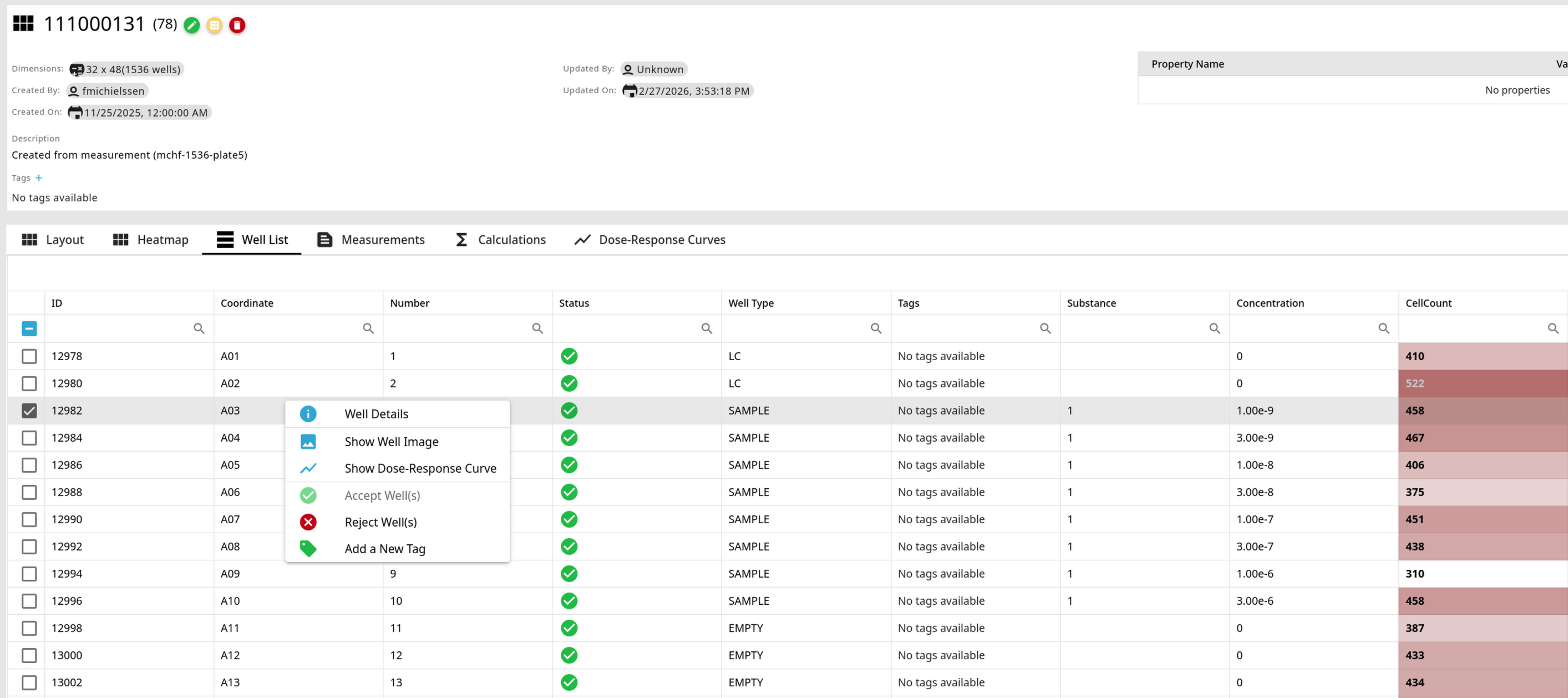
- In most tables that list entities (experiments, plates, wells, …) rows can be single-clicked to select (highlight) an item. Information or details about the selected item may then appear in any open side-panels; for example a Well Image side-panel may display the image of a selected well.
- Likewise, double-clicking an item will open a separate details page for that item; for example double-clicking on a plate will open the Plate Details page.
- A right-click on an item will open a context menu with relevant actions you can perform on that item; for example right-clicking on a well will allow you to perform actions such as Accept or Reject Well.